
QuickBooks Payroll Error PS107 occurs when QuickBooks detects a problem while downloading, installing, or validating payroll updates during payroll setup. The error generally indicates that QuickBooks has identified an issue with payroll configuration files, payroll service information, or update components that require attention before payroll services can function normally.
When Error PS107 appears, users may be unable to complete payroll setup, install payroll updates, or access certain payroll features. Because payroll services rely on updated tax tables and active payroll configuration files, the error can interrupt payroll processing and prevent businesses from staying compliant with current tax regulations.
QuickBooks Error PS107 is commonly linked to incomplete payroll updates, damaged payroll files, inactive payroll subscriptions, corrupted QuickBooks components, or payroll setup inconsistencies.
Why Does QuickBooks Payroll Error PS107 Occur
QuickBooks Payroll Error PS107 usually occurs when QuickBooks encounters problems validating payroll setup information or processing payroll updates. The issue often appears when payroll components become outdated or damaged.
Payroll setup and update issues related to Error PS107 are commonly caused by:
- Incomplete payroll update installation
- Damaged payroll files
- Corrupted CPS folder
- Inactive payroll subscription
- Invalid payroll service information
- Outdated QuickBooks Desktop version
- Payroll setup configuration issues
- Company file corruption
- Interrupted payroll update process
- Firewall or antivirus restrictions
What Error Messages Appear With QuickBooks Payroll Error PS107
QuickBooks Error PS107 typically appears when QuickBooks detects issues with payroll updates or payroll setup validation.
“Payroll Update Error PS107”
- Meaning: QuickBooks encountered a problem while processing payroll updates.
- Cause: Damaged update files or payroll configuration issues.
- Impact: Payroll services may become unavailable.
“An Internal File in QuickBooks Has Become Unreadable”
- Meaning: QuickBooks cannot access required payroll files.
- Cause: Corrupted payroll components.
- Impact: Payroll setup and updates fail.
“Payroll Service Cannot Be Updated”
- Meaning: QuickBooks cannot install payroll update files.
- Cause: Incomplete payroll update installation.
- Impact: Tax table updates remain pending.
“Payroll Setup Requires Attention”
- Meaning: QuickBooks detected a problem with payroll configuration.
- Cause: Missing or invalid payroll information.
- Impact: Payroll functionality becomes limited.
What Problems Can QuickBooks Payroll Error PS107 Create
Error PS107 can affect multiple payroll functions and prevent payroll services from operating correctly.
- Payroll updates stop downloading: QuickBooks cannot complete payroll update installation.
- Payroll setup remains incomplete: Required payroll configuration information cannot be validated successfully.
- Tax table updates fail: Latest payroll tax rates are not installed.
- Payroll processing becomes unavailable: Users may be unable to create employee paychecks.
- Payroll service warnings continue appearing: QuickBooks repeatedly displays payroll-related notifications.
- Direct deposit services may be affected: Payroll transmission services may stop working until the issue is resolved.
Quickly Resolve the Quickbooks Payroll Error PS107
In this section, we’ll guide you through a series of step‑by‑step methods designed to resolve the underlying causes of QuickBooks Error PS107. Follow each solution carefully to restore smooth payroll updates without interruptions.
How To Verify That Your Payroll Subscription Is Active
Payroll validation failures are one of the most common causes of QuickBooks Payroll Error PS107.
Follow These Steps
- Open QuickBooks Desktop.
- Select Employees > My Payroll Service > Account/Billing Information.
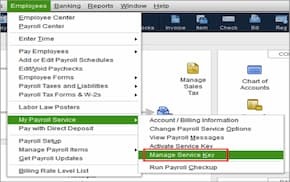
- Sign in using your Intuit account credentials.
- Review payroll subscription status.
- Confirm the subscription shows Active.
Estimated Time: 5–10 Minutes
Risk Level: Low
Verification: Payroll subscription should display Active status.
How To Install the Latest QuickBooks Updates
Running an outdated QuickBooks version can prevent payroll setup files from communicating properly with payroll services.
Follow These Steps
- Open QuickBooks Desktop.
- Select Help > Update QuickBooks Desktop.
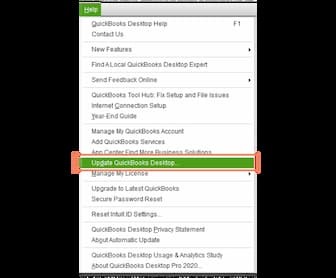
- Click Update Now.
- Select Get Updates.
- Restart QuickBooks after installation.
Estimated Time: 10–15 Minutes
Risk Level: Low
Verification: Confirm the latest QuickBooks release is installed.
How To Download the Entire Payroll Update Again
Damaged payroll update files can trigger Error PS107 even when payroll downloads appear successful.
Follow These Steps
- Open QuickBooks Desktop.
- Select Employees > Get Payroll Updates.
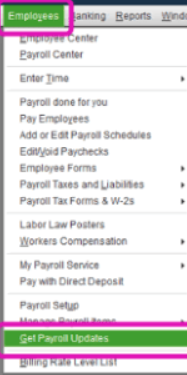
- Check Download Entire Update.
- Click Update.
- Allow the download to complete.
Estimated Time: 10–15 Minutes
Risk Level: Low
Verification: The latest payroll tax table should install successfully.
How To Repair Payroll Files by Renaming the CPS Folder
The CPS folder stores payroll update files. Corruption within this folder is a frequent trigger for payroll setup errors.
Follow These Steps
- Close QuickBooks Desktop.
- Open File Explorer.
- Navigate to:
C:\Program Files\Intuit\QuickBooks Components\Payroll
- Locate the CPS folder.
- Rename it to CPSOLD.
- Open QuickBooks again.
- Download payroll updates.
Estimated Time: 5–10 Minutes
Risk Level: Medium
Verification: QuickBooks should create a new CPS folder automatically.
Can Company File Damage Trigger QuickBooks Payroll Error PS107
Yes. Payroll setup relies on company file information to validate payroll services and employee payroll data. Damage within the company file can interrupt payroll setup and payroll updates.
Common company file-related payroll issues include:
- Payroll validation failures
- Employee record inconsistencies
- Payroll update installation problems
- Tax table synchronization issues
- Payroll processing interruptions
Running Verify Data and Rebuild Data utilities can often repair these issues.
How Can QuickBooks Tool Hub Help Resolve Error PS107
QuickBooks Tool Hub can repair damaged payroll components, QuickBooks program files, and company file issues that contribute to payroll setup failures.
Follow These Steps
- Install QuickBooks Tool Hub.
- Open the utility.
- Select Program Problems.
- Run Quick Fix my Program.
- Open Company File Issues.
- Run QuickBooks File Doctor.
- Restart QuickBooks.
Estimated Time: 20–30 Minutes
Risk Level: Low
Verification: Payroll setup and updates should function normally.
Preventive Measures For QuickBooks Payroll Error PS107
QuickBooks Payroll Error PS107 often arises when payroll components, updates, or subscription validations are disrupted. By proactively maintaining your system, you reduce the risk of sudden failures during payroll runs and ensure smoother updates.
Keep QuickBooks updated
- Regularly install the latest QuickBooks Desktop releases to ensure compatibility with payroll services and tax tables.
Install payroll updates regularly
- Download and apply payroll tax table updates as soon as they’re available to avoid outdated calculations.
Verify payroll subscription status
- Periodically check that your payroll subscription is active to prevent interruptions during updates.
Maintain current billing information
- Ensure your payment details are up to date so subscription renewals don’t fail unexpectedly.
Back up company files
- Create frequent backups before running payroll updates to safeguard against data corruption.
Run Verify Data checks
- Use QuickBooks’ built-in tool to detect and fix data integrity issues that could trigger payroll errors.
Avoid interrupting payroll updates
- Let updates complete fully closing QuickBooks or losing internet connection mid‑update can cause PS107.
Review payroll service settings
- After major QuickBooks or Windows updates, confirm payroll service configurations remain intact.
QuickBooks Payroll Error PS107 and Migration
Error PS107 often surfaces during migration processes because payroll update files and subscription validation are highly sensitive to environment changes. Whether moving from QuickBooks Desktop to QuickBooks Online or transitioning to ERP platforms (NetSuite, SAP, Dynamics 365), migration can disrupt payroll update integrity and trigger PS107.
How Migration Triggers PS107
- Damaged Payroll Update Files – File transfers during migration may corrupt or misplace payroll update components.
- Subscription Validation Issues – Service keys or EIN details may not migrate correctly, causing QuickBooks to reject payroll updates.
- Firewall/Security Rule Changes – New environments often block QuickBooks executables (QBW32.exe, QBUpdate.exe).
- Company File Compatibility – ERP migrations may alter file structures, breaking payroll update validation.
- Network/SSL Misalignment – Migration resets or stricter ERP rules can prevent QuickBooks from connecting to Intuit servers.
QuickBooks Payroll Error PS107 – Affecting Errors
Error PS107 doesn’t always occur in isolation. Because it stems from payroll update corruption, subscription validation, or environment misalignment, it often overlaps with or triggers related payroll errors. Understanding these connections helps technicians anticipate secondary issues during troubleshooting.
Common Errors Affected by PS107:
- Error PS032: Occurs when payroll update files are damaged or incomplete. PS107 often precedes PS032 if the update process halts midway.
- Error PS033: Linked to corrupted tax table configuration. If PS107 blocks updates, tax tables may remain outdated, leading to PS033.
- Error PS036: Subscription validation failures are common when PS107 interrupts payroll update checks.
- Error 12007: Internet connectivity or firewall misconfiguration errors often appear alongside PS107 during payroll update attempts.
- Error 15240: File permission or digital signature issues can surface when PS107 corrupts payroll update executables.
Conclusion
QuickBooks Payroll Error PS107 generally appears when QuickBooks encounters problems during payroll setup, payroll validation, or payroll update installation. Damaged payroll files, incomplete payroll updates, inactive payroll subscriptions, and company file corruption are among the most common causes.
Verifying payroll subscriptions, updating QuickBooks, downloading fresh payroll updates, repairing payroll files, and correcting company file issues typically resolve the error. Regular payroll maintenance can also help prevent future payroll setup interruptions.
FAQs
What does QuickBooks Payroll Error PS107 mean?
QuickBooks Error PS107 indicates that QuickBooks encountered a problem while validating payroll setup information or installing payroll updates.
Is PS107 a payroll subscription error?
Not always. Although subscription issues can trigger PS107, damaged payroll files and setup configuration problems are also common causes.
Can outdated QuickBooks versions cause PS107?
Yes. Running an outdated QuickBooks release may create compatibility issues with payroll services.
Does renaming the CPS folder fix Error PS107?
In many cases, yes. Renaming the CPS folder replaces damaged payroll update files.
Can company file corruption trigger Error PS107?
Yes. Damaged company data can interfere with payroll setup and payroll update installation.
Can QuickBooks Tool Hub resolve Error PS107?
Yes. Tool Hub utilities can repair program and company file issues contributing to payroll setup failures.