
QuickBooks Payroll Error 15215 occurs when QuickBooks fails to verify the digital signature of a payroll update while downloading or installing payroll tax table updates. The error generally appears when QuickBooks cannot establish a secure connection with Intuit servers or when another application interferes with the update process.
Payroll updates require digital signature verification to confirm that update files originate from a trusted source. When this verification fails, QuickBooks blocks the installation to protect payroll data and system security. As a result, payroll updates remain incomplete and users may continue working with outdated tax tables.
QuickBooks Error 15215 is commonly associated with internet communication conflicts, firewall restrictions, digital certificate validation failures, or applications consuming excessive network resources. The issue primarily affects payroll updates rather than general QuickBooks functionality.
Why Does QuickBooks Payroll Error 15215 Occur?
QuickBooks Payroll Error 15215 mainly occurs when QuickBooks cannot verify the authenticity of payroll update files during the download process. Digital signature verification failures and internet communication interruptions are the most common reasons behind the error.
Payroll update failures related to Error 15215 are commonly caused by:
- Digital signature verification failures
- QuickBooks not running as Administrator
- Firewall blocking QuickBooks updates
- Antivirus interference
- Internet connection interruptions
- Windows security restrictions
- Conflicts with background applications
- Damaged payroll update files
- Outdated QuickBooks Desktop version
- Incorrect Internet Explorer settings
What Error Messages Appear With QuickBooks Payroll Error 15215?
QuickBooks Error 15215 usually appears during payroll updates when QuickBooks cannot verify update files securely.
“Error 15215: Unable to verify digital signature.”
- Meaning: QuickBooks could not validate the authenticity of the payroll update.
- Cause: Security verification failure or interrupted connection.
- Impact: Payroll updates cannot be installed.
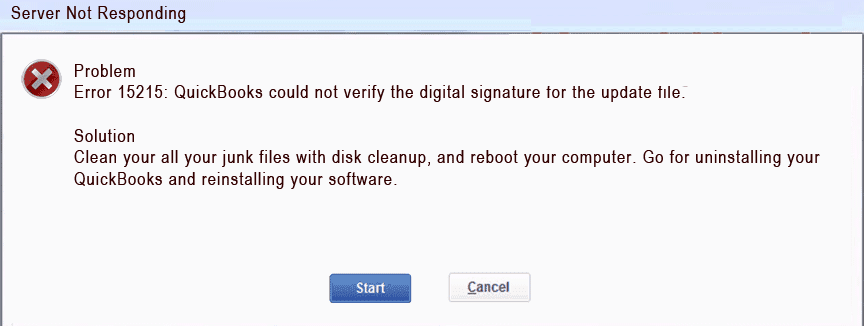
“Payroll update did not complete successfully.”
- Meaning: The payroll update process stopped before installation finished.
- Cause: Digital signature validation failure.
- Impact: Payroll tax tables remain outdated.
“The update server is not responding.”
- Meaning: QuickBooks failed to communicate properly with Intuit servers.
- Cause: Firewall restrictions or internet issues.
- Impact: Payroll downloads fail.
“QuickBooks cannot complete the payroll update.”
- Meaning: Required update files could not be validated successfully.
- Cause: Damaged update files or security restrictions.
- Impact: Payroll processing may be affected.
What Symptoms Indicate QuickBooks Payroll Error 15215?
QuickBooks Error 15215 primarily affects payroll updates, tax table downloads, and update verification processes. Most users experience repeated update failures before identifying the error.
- Payroll updates stop before completion: QuickBooks downloads part of the update but fails during digital signature verification.
- Tax table updates remain outdated: Latest payroll tax calculations are not installed successfully.
- Payroll update notifications appear repeatedly: QuickBooks continues prompting users to install payroll updates.
- Secure connection warnings appear: Users may notice certificate or security-related warnings during updates.
- Payroll services become temporarily unavailable: Certain payroll features may not function until updates are installed.
- QuickBooks becomes slow during updates: The software may freeze or become unresponsive while attempting to verify update files.
Fix QuickBooks Payroll Error 15215 in Minutes
QuickBooks Payroll Error 15215 can usually be resolved by repairing update communication settings, running QuickBooks with elevated permissions, and eliminating digital signature verification conflicts. The troubleshooting methods below focus specifically on fixing payroll update verification failures.
Solution 1: Run QuickBooks as Administrator
Insufficient Windows permissions can prevent QuickBooks from validating payroll update files properly.
Follow These Steps to Run QuickBooks as Administrator
- Close QuickBooks Desktop.
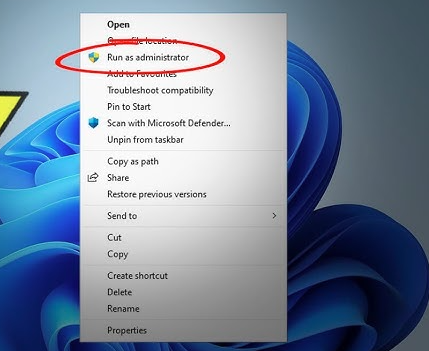
- Right-click the QuickBooks icon.
- Select Run as Administrator.
- Open QuickBooks.
- Retry the payroll update.
Estimated Time: 2–3 minutes
Risk Level: Low
Verification: Payroll updates should proceed without security-related interruptions.
Solution 2: Download Payroll Updates in Safe Mode
Running updates in a clean environment helps eliminate interference from background applications.
Follow These Steps to Update Payroll in Safe Mode
- Restart the computer.
- Press F8 before Windows loads.
- Select Safe Mode with Networking.
- Open QuickBooks Desktop.
- Download payroll updates.
Estimated Time: 10–15 minutes
Risk Level: Low
Verification: Payroll updates should install successfully.
Solution 3: Verify Internet Explorer Settings
QuickBooks relies on Internet Explorer settings to establish secure communication with update servers.
Follow These Steps to Verify Browser Settings
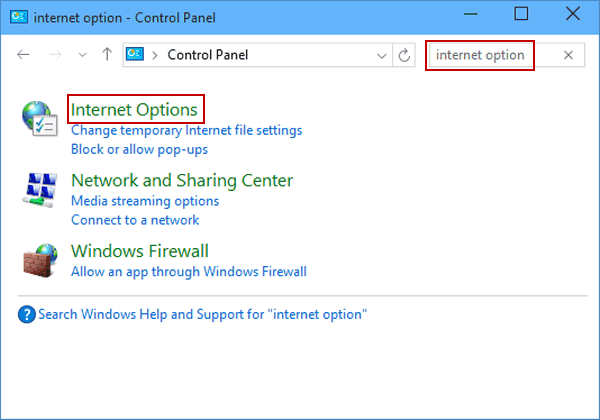
- Open Control Panel.
- Select Internet Options.
- Open the Advanced tab.
- Scroll to Security settings.
- Verify SSL settings are enabled.
- Restore default browser settings.
- Save changes and restart Windows.
Estimated Time: 5–10 minutes
Risk Level: Low
Verification: Retry payroll updates after restarting the system.
Solution 4:Configure Firewall Settings for QuickBooks
Firewall restrictions may prevent QuickBooks from communicating with Intuit update servers.
Important QuickBooks Files:
- QBW32.exe
- QBUpdate.exe
- QBDBMgrN.exe
- IntuitSyncManager.exe
Follow These Steps to Configure Firewall Rules:
- Open Windows Defender Firewall.
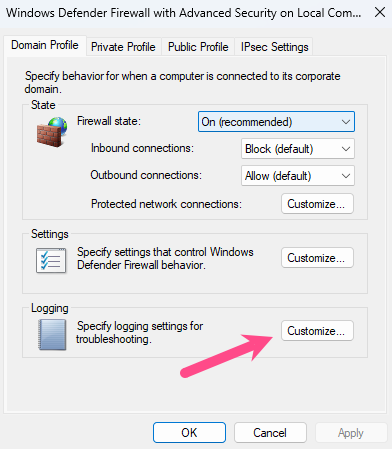
- Select Advanced Settings.
- Create inbound rules for QuickBooks files.
- Create outbound rules for QuickBooks files.
- Allow all required connections.
- Restart the computer.
Estimated Time: 10–20 minutes
Risk Level: Medium
Verification: Retry payroll updates after firewall configuration.
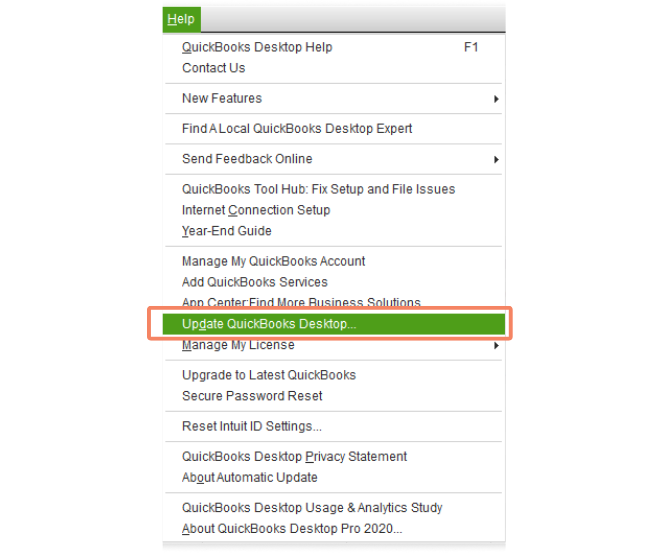
Solution 5: Update QuickBooks Desktop to the Latest Release
Outdated QuickBooks versions may contain update-related bugs that trigger digital signature verification failures.
Follow These Steps to Update QuickBooks
- Open QuickBooks Desktop.
- Select Help > Update QuickBooks Desktop.
- Open the Update Now tab.
- Click Get Updates.
- Restart QuickBooks after installation.
Estimated Time: 10–15 minutes
Risk Level: Low
Verification: Confirm the latest release version is installed.
Solution 6: QuickBooks Tool Hub Fix Error 15215
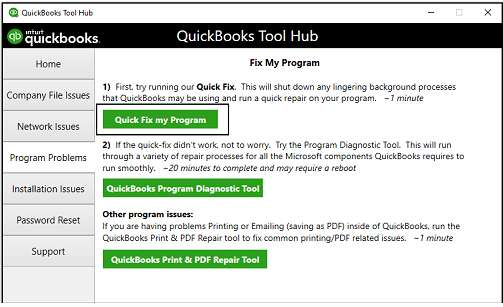
QuickBooks Tool Hub can repair damaged update components and resolve common payroll update failures.
Follow These Steps to Use QuickBooks Tool Hub
- Download and install QuickBooks Tool Hub.
- Open the utility.
- Select Program Problems.
- Run Quick Fix my Program.
- Restart QuickBooks.
- Retry payroll updates.
Estimated Time: 15–20 minutes
Risk Level: Low
Verification: Payroll updates should complete successfully.
Can Antivirus Software Trigger QuickBooks Error 15215
Yes. Antivirus applications may block digital certificate verification or interrupt payroll update downloads, resulting in Error 15215.
Antivirus-related update failures commonly include:
- Blocking payroll update files
- Interrupting digital signature verification
- Restricting secure internet communication
- Scanning update files continuously
- Preventing QuickBooks from accessing update servers
Temporarily disabling antivirus protection during updates often resolves the issue.
QuickBooks Payroll Error 15215 – Desktop Vs Online
QuickBooks Payroll Error 15215 primarily affects QuickBooks Desktop because Desktop relies on locally downloaded payroll updates and digital signature verification processes. The error appears when QuickBooks cannot authenticate update files securely.
QuickBooks Online does not typically experience Error 15215 because payroll updates are managed automatically through Intuit’s cloud infrastructure.
15215 During Migration from QuickBooks Desktop to ERP Systems
QuickBooks Payroll Error 15215 can significantly disrupt Desktop to ERP migrations (e.g., Business Central, NetSuite, SAP) because payroll updates must be validated before data transfer. If QuickBooks fails to verify the digital signature of payroll update files, the Desktop company file remains outdated, blocking ERP migration utilities that require the latest release and tax tables.
When migrating from ERP back to Desktop, Error 15215 may appear if the imported company file references payroll components that cannot be validated locally. ERP systems handle payroll differently, so QuickBooks Desktop must re‑establish secure communication with Intuit servers. If firewall restrictions, antivirus interference, or damaged update files persist, payroll updates fail, leaving the Desktop environment incomplete.
Other Errors Affected by Payroll Update Failures
QuickBooks Payroll Error 15215 often overlaps with or triggers other update‑related errors because the underlying causes — digital signature verification failures, firewall restrictions, and damaged update files — are shared across multiple payroll processes. When troubleshooting 15215, users should also be aware of the following related errors:
- Error 15271 – Incomplete payroll update installation caused by corrupted or interrupted files.
- Error PS033 – Damaged payroll files linked to update failures, often escalating from signature verification issues.
- Error 12157 – Internet communication conflicts similar to 15212, preventing secure server connections.
Conclusion
QuickBooks Payroll Error 15215 mainly occurs when QuickBooks fails to verify the digital signature of payroll update files. Firewall restrictions, antivirus interference, internet communication problems, and insufficient permissions are among the most common reasons behind the issue.
Running QuickBooks as Administrator, repairing internet settings, configuring firewall permissions, and updating QuickBooks Desktop usually resolve the error successfully. Maintaining proper security and update configurations can also help prevent future payroll update verification failures.
FAQs
Q1. What does QuickBooks Payroll Error 15215 mean?
QuickBooks Error 15215 indicates that QuickBooks cannot verify the digital signature of a payroll update file.
Q2. Why does digital signature verification fail?
Verification failures usually occur because of firewall restrictions, internet communication issues, antivirus interference, or Windows security settings.
Q3. Can running QuickBooks as Administrator fix Error 15215?
Yes. Administrator privileges often resolve permission-related update verification failures.
Q4. Does antivirus software cause Error 15215?
Yes. Antivirus programs may block payroll update files or interfere with digital signature validation.
Q5. Can firewall settings trigger payroll update failures?
Yes. Firewall restrictions can prevent QuickBooks from communicating with Intuit update servers.
Q6. Does QuickBooks Online experience Error 15215?
No. Error 15215 mainly affects QuickBooks Desktop because payroll updates are downloaded and validated locally.